
Most YouTube creators upload their video, write quick title, paste some tags, and wait. The views do not come. The algorithm does not notice and creator think what went wrong.
The answer is always the same that is no YouTube SEO done.
YouTube SEO is not only adding tags. It includes your title structure, keyword selection, description quality, thumbnail click through rate, and how your entire channel is positioned for discovery across search results, suggested videos, and Google.
These 11 free SEO tools for YouTube address the three biggest channel growth blockers:
- weak keyword targeting
- low click-through rates
- zero performance tracking after publishing.
You do not need to spend thousands on software. Most channels under 1 lakh subscribers grow using free tools. The difference between channel stuck at 500 views per video and one climbing to 50000 usually is not budget. It is whether they research before recording.
Here is what to know before you start:
- These tools were tested against what channels ranking in top 5 YouTube search results in competitive niches actually use.
- Backlinko’s YouTube ranking study highlights keyword research as the first and most critical step in YouTube SEO.
- Each tool covers specific jobs such as free YouTube keyword research, YouTube keyword tool functions, SEO tags generator tasks, YouTube tag checker features, analytics, and content development.
Pick one tool. Use it on your next video. Build from there.
Why YouTube SEO Matters for Channel Growth
1. YouTube Works Like Search Engine
People use YouTube for searching like Google. They search for product reviews, tutorials, recipes, fitness plans, travel tips, and many more things. For example:
When someone types ‘best free video editing software for beginners’ into search bar, YouTube runs ranking algorithm. It checks your title, description, tags, watch time, engagement, and thumbnail performance to decide what to show. If your video is not SEO optimized then it does not appear even if your content is better than everything ranking above it.
This is why optimization matters. It helps creators understand what people want before recording video. Instead of uploading random ideas, you can plan videos around real searches, clear questions, and useful topics. The best tools for YouTube channel growth help you find those searches and turn them into better videos especially when you combine free SEO tools for YouTube with free YouTube keyword research tools.
2. Better SEO Helps Videos Get Found
Good YouTube SEO can help your videos appear in YouTube search results, suggested videos, Google video results, playlists, Shorts discovery, and channel recommendations. Suggested videos matter because YouTube recommends related content to viewers who are already watching similar topic. So when your title, thumbnail, description, chapters, and content all match same topic then platform can understand your video better.
3. Metadata Helps Search Engines Understand Your Video
Google recommends using clear video metadata because it helps search engines understand, index, and display video content. This includes keyword optimized titles and descriptions, schema markup, and video sitemaps.
When you use free SEO tools for YouTube to build strong title and write properly structured description, you are not only optimizing for YouTube search. You are also improving your videos visibility in Google results. Many channels get 20 to 30% of their traffic from Google and most creators never target it.
Best Free SEO Tools for YouTube in 2026
Here are 11 tested and selected free SEO tools for YouTube that you can use to grow your channel.
1. YouTube Search Suggest
YouTube search suggest is one of the simplest free SEO tools for YouTube because it shows what users are actively searching for. When you type keyword in YouTube search bar, it gives autocomplete ideas.
Best for: To find real search queries directly from YouTube.
How to use it:
- Use strongest keyword in your video title
- Type your seed keyword into YouTube search bar.
- Write down autocomplete suggestions that appear.
- Add letter after your keyword (digital marketing tips a, digital marketing tips b) to surface more variations.
- Identify long tail options with clear intent.
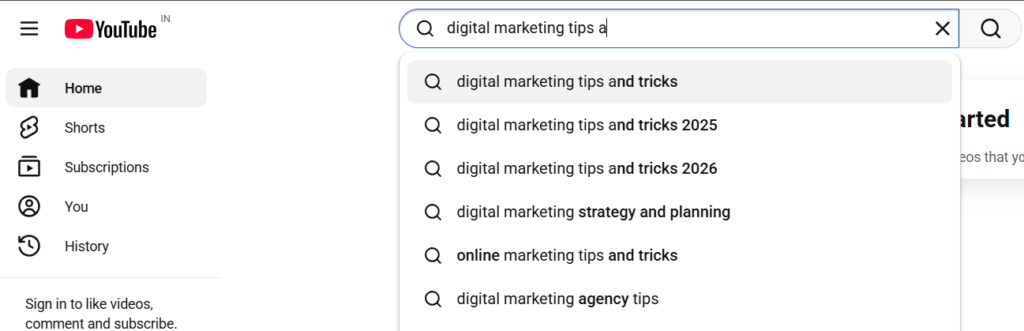
For example, we search keyword ‘digital marketing tips’ on YouTube search bar and YouTube suggest:
- Digital marketing tips and tricks
- Digital marketing strategy and planning
- Digital marketing agency tips
| Practical tip: Do this before you record your video, not after you upload. The keyword shapes your script, your title, and your entire metadata strategy |
2. Google Trends
Google Trends shows how interest in search term changes over time. It includes YouTube Search filter that gives you YouTube specific data instead of general web search numbers.
Best for: Finding trending topics and comparing keyword popularity.
How to use it:
- Go to trends.google.com
- Enter your video topic
- Switch the filter to YouTube Search
- Compare two or three keyword variations
- Choose the one with rising or consistent interest
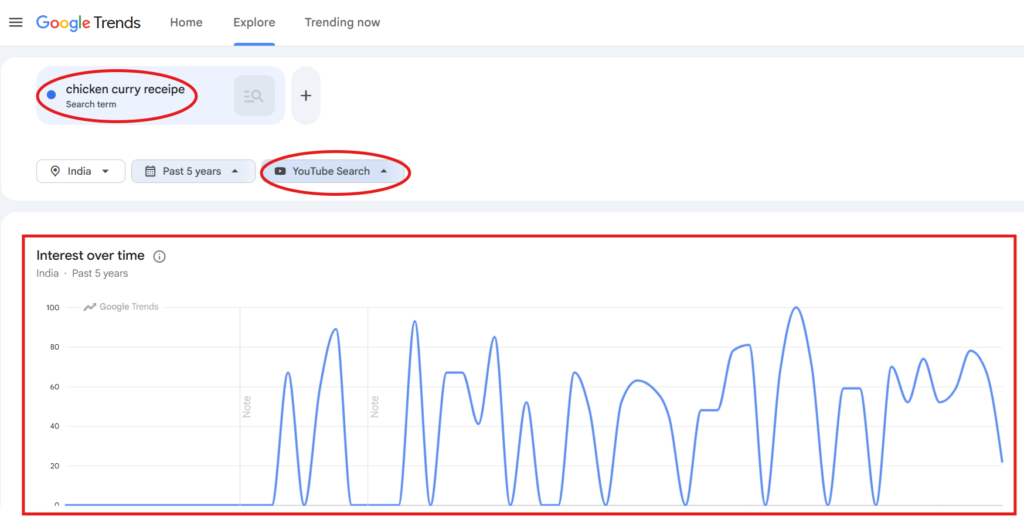
It works well with free YouTube keyword research tools because it adds timing to your topic planning.
3. KeywordTool.io YouTube Keyword Tool
KeywordTool.io is dedicated YouTube keyword tool that pulls suggestions from YouTube’s autocomplete system. It covers both regular videos and YouTube Shorts, functioning as free YouTube keyword research tool and basic SEO tags generator in one place. For creators focused on tools for YouTube channel growth, it removes guesswork from tag and hashtag selection.
Best for: Generating keyword ideas, tags, and hashtags.
How to use it:
- Go to keywordtool.io and select YouTube
- Enter your main topic
- Collect keyword ideas from results list
- Select long tail terms that match your video’s search intent
- Add best options naturally to your title, description, and tags
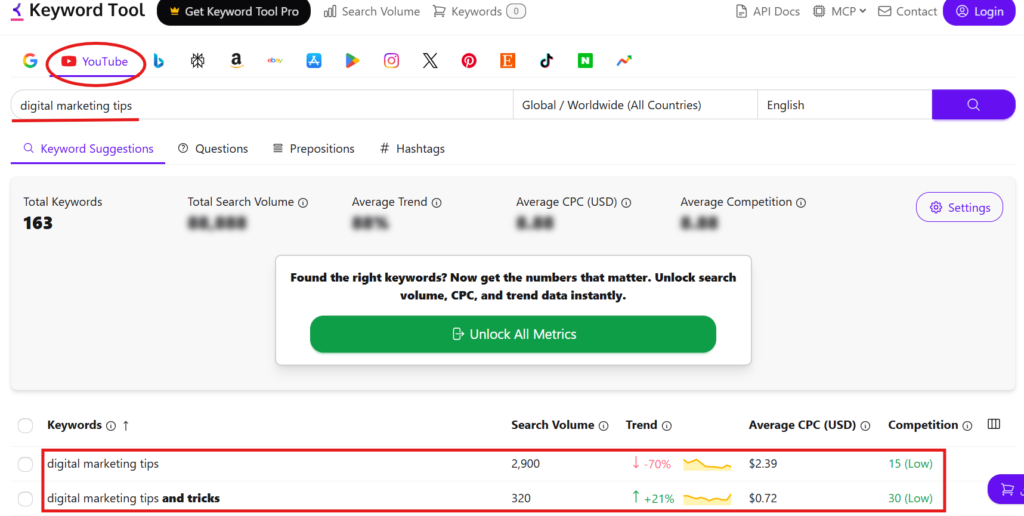
| Limitation: Detailed search volume data is behind paid plan. For most beginner channels, free keyword suggestions are sufficient to start. |
4. SEO Review Tools
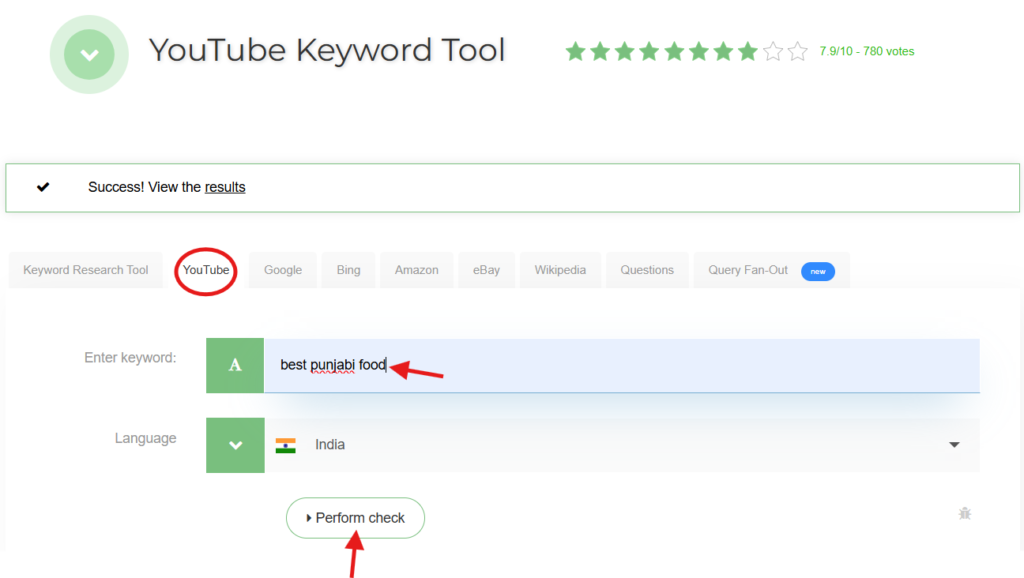
SEO Review Tools offers free YouTube keyword research tool that generates up to 130 keyword suggestions per search, based on YouTube autocomplete and also country specific filtering. It is one of the more accessible free tools for YouTube creators who need keyword ideas without signing up.
Best for: fast keyword lists with no account required
How to use it:
- Go to seoreviewtools.com and open the YouTube keyword tool
- Enter your video topic
- Select your target country
- Review the keyword list
- Select terms with clear video intent: how-to queries, reviews, tutorials
- Add the best options to your title, description, and chapter headings
5. vidIQ
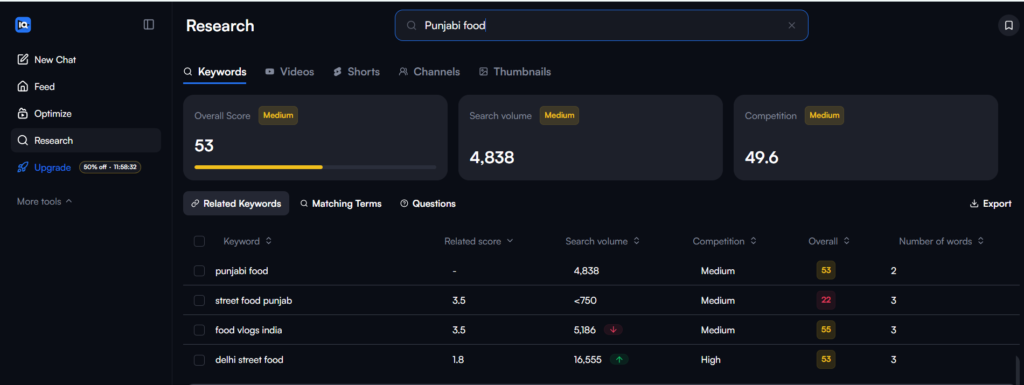
vidIQ is one of the most widely used free SEO tools for YouTube. Also available as Chrome extension and web dashboard, its free plan covers keyword research, competitor video analysis, and basic channel performance tracking.
Its free version shows estimated monthly search volume, competition scores, related keyword terms, and trend direction. It is one of the more complete free YouTube keyword research tools without paid subscription.
Best for: Keyword research, competitor analysis, and performance tracking
How to use it:
- Install vidIQ browser extension or access web dashboard
- Search your target keyword
- Check the competition score and estimated monthly searches
- Examine the top-ranking videos for that keyword
- Refine your title and description based on what’s already ranking
6. TubeBuddy
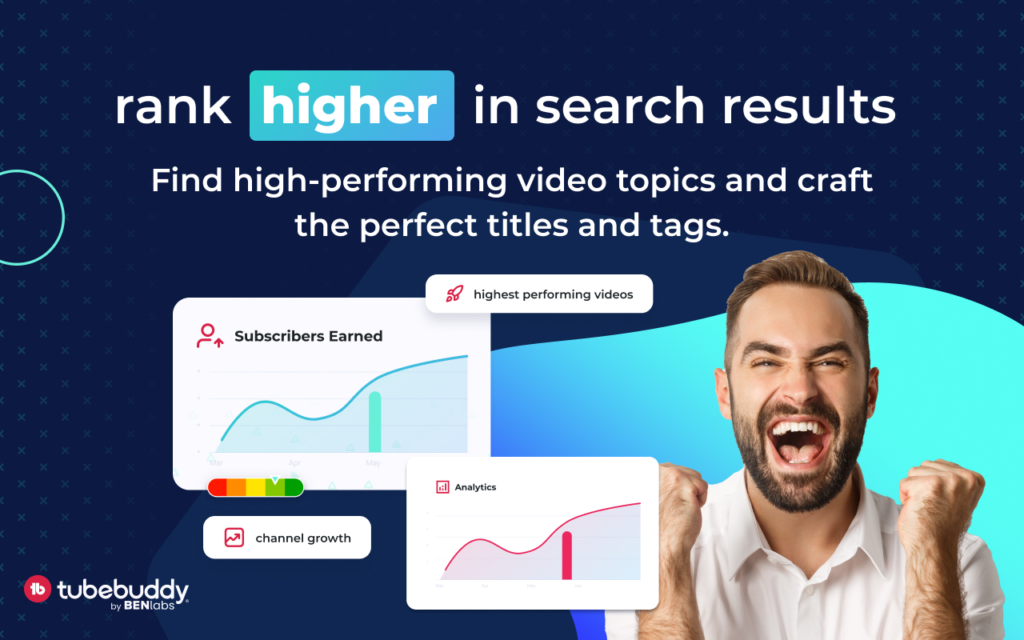
This is another useful tool for YouTube creators who upload regularly. TubeBuddy is browser extension that operates directly inside YouTube Studio. Its free version works as YouTube tag checker and SEO tags generator, giving you optimization support during upload process without switching between multiple tabs.
Best for: Basic YouTube optimization and productivity.
Free features include:
- Keyword Explorer with basic search data
- Tag suggestions during video upload
- Title optimization tips
- Basic video SEO checklist
- Productivity tools for managing your channel
7. YouTube Studio Analytics
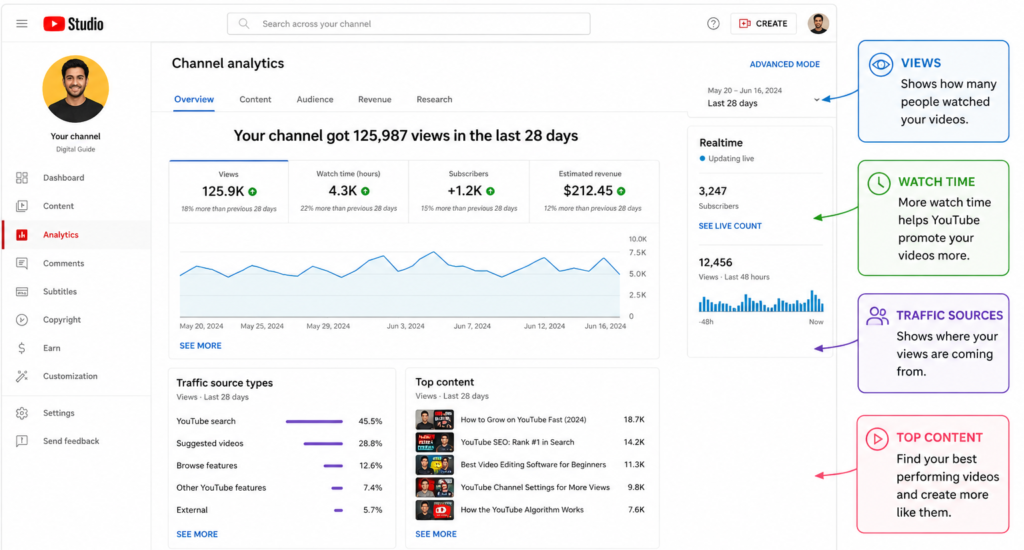
YouTube Studio Analytics is free for every channel and gives you more actionable data than most third party tools. Most creators focus on total views when numbers that actually matter are elsewhere. YouTube Studio shows what viewers actually did after seeing your video.
Best for: Understanding how your own videos are performing.
What to check:
| Impressions | How many times has your thumbnail appeared to viewers |
| Click-through rate (CTR) | Percentage of impressions that became views |
| Average view duration | How long people watch before leaving |
| Traffic sources | Where viewers are finding your video |
| Search terms | Exact queries bringing people to your conten |
| Audience retention graph | Where viewers drop off |
For example, If video has strong impressions but CTR below 3%, your title and thumbnail needs revision. If CTR is good but average view duration is under 30% then your intro and video structure is problem.
8. YouTube Studio Research Tab
Inside YouTube Studio Analytics, there is research tab that most creators never open. It shows what topics your audience is actively searching for on YouTube and flags content gaps where demand exists but few videos cover topic well. This is useful because it connects research with your own audience data.
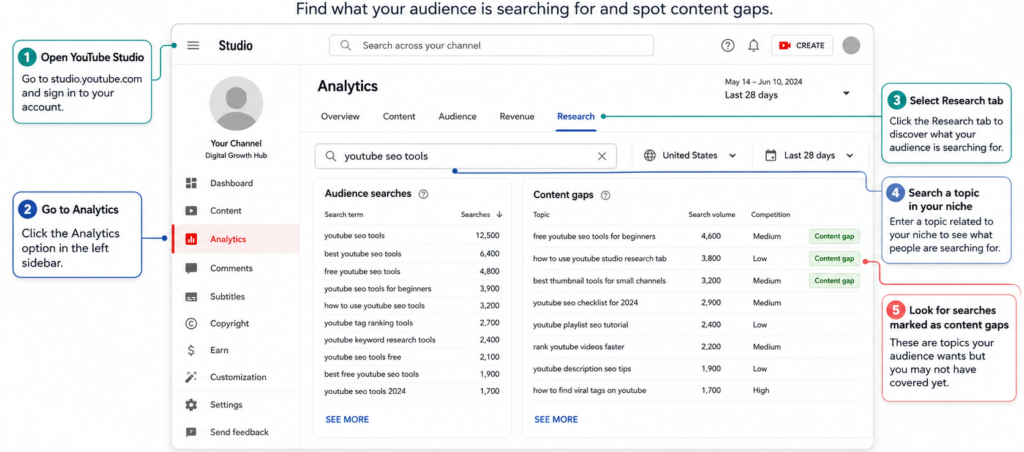
How to use it:
- Open YouTube Studio
- Go to Analytics
- Select research tab
- Search topic in your niche
- Look for searches marked as content gaps
- Build videos specifically around those underserved topics
9. Canva
Canva belongs in any list of free SEO tools for YouTube because thumbnails directly affect click through rate. YouTube has confirmed that title, thumbnail, and description are stronger discovery signals than tags. Video ranking for competitive keywords still fails if your thumbnail does not earn click.
Best for: Creating thumbnails that earn clicks
How to use it:
- Use 1280 x 720 px thumbnail preset in Canva
- Keep on image text to five words
- Use clear face, product, or visual that reflects what the video actually delivers
- Maintain strong contrast between text and background
- Test different thumbnail designs on similar videos and compare CTR in YouTube Studio
10. ChatGPT
ChatGPT can speed up YouTube planning when you already have topic and keyword. It helps you in brainstorming titles, writing script and strong hooks. It generates title and description variations quickly and saving time on drafting process. You just need to know about ChatGPT prompts that help you to create content.
Here are some useful ChatGPT prompts:
- Give me 10 YouTube title ideas for [your topic] using this keyword [add keywords]
- Write YouTube description using this keyword naturally [add keyword]
- Create 60 second video hook for video about [your topic]
- Generate YouTube chapter markers from this transcript
- Suggest FAQ questions viewer might have about [your topic]
11. YouTube Rank Checker Tools
YouTube rank checker tools help you track whether video appears for your target keyword. Tools like TubeRanker and GeoRanker offer YouTube rank checking by keyword, location, and sometimes device. This matters for YouTube SEO because ranking position is not clearly visible inside YouTube Studio.
Best for: Monitoring where your videos rank for specific keywords
How to use it:
- Enter your video URL
- Add your target keyword
- Select country and your location
- Check your current ranking
- Re-check after updating your title, description, and adding chapter timestamps
Also Read: How to Get 1K Subscribers on YouTube Organically in 2026?
Common YouTube SEO Mistakes to Avoid
1. Using Only Tags and Ignoring Title
Tags are weak ranking signal. YouTube’s own documentation confirms that title and thumbnail carry more weight in discovery. If your target keyword is not in your title then tags won’t fix that.
2. Writing Clickbait Titles
Clickbait earns click then destroys retention. Viewers who feel misled leave within first 30 seconds. YouTube reads that as failed video and reduces distribution. You need clear, keyword focused title that consistently outperforms clickbait.
3. Ignoring Thumbnails
Video ranking for strong keywords still fails if nobody clicks it. CTR is direct YouTube SEO ranking signal. Building better thumbnail with Canva’s free version is one of the highest return activities in any tools for YouTube channel growth strategy.
4. Copying Competitor Tags Blindly
Competitor research is useful but copying tags without understanding intent is weak SEO. Use YouTube tag checker to study patterns then build your own keyword set around your video’s real topic.
5. Not Checking Analytics
Most creators check total views and stop there. CTR, average view duration, audience retention, and traffic sources tell you what to fix. If you are not reviewing these numbers weekly, you repeat same problems on every upload.
6. Targeting Keywords That Are Too Broad
If you have new YouTube channel then you don’t need to target board keywords. Use narrow keywords such as:
- Too broad: SEO
- Better: free SEO tools for YouTube
- Even better: best free SEO tools for YouTube beginners 2026
Long-tail keywords have lower competition and clearer intent.
Start Growing Your YouTube Channel With Free Tools Today
You have everything you need to build real YouTube SEO strategy without paying for single tool.
| Keyword research | YouTube Search Suggest, Google Trends, vidIQ, KeywordTool.io, and SEO Review Tools. |
| Optimization | TubeBuddy’s YouTube tag checker and vidIQ handle tag suggestions, SEO tags generator work, and title checks. |
| Analytics | YouTube Studio gives you more data than most creators act on. |
| Design | Canva handles thumbnails at the exact size YouTube recommends. |
| Content development | ChatGPT speeds up title testing |
| Rank tracking | TubeRanker and GeoRanker show where your videos stand. |
The channels that grow are not the ones spending the most on tools for YouTube channel growth. They are the ones using free SEO tools for YouTube consistently, checking analytics every week, and making changes based on what data shows.
Most creators upload 10 videos before they open single retention graph. But one hour inside YouTube Studio tells you more about your channel than months of guessing.
