
Is your website looking outdated?
Has your traffic dropped after redesign?
Are visitors leaving without converting into leads?
If any of these questions you answered ‘yes’ that means it is the right time to follow proper website redesign checklist before making any changes. That warning matters because poorly planned website redesign can reduce organic traffic by 20 to 40% within the first month if redirects, content, and technical SEO are overlooked.
At EdibleWebTech, we have managed website redesign projects for businesses across industries including education, eCommerce, healthcare, and service based companies. One of our education sector clients recovered its organic traffic within 45 days after launch by following structured website redesign checklist.
| Website redesign checklist: 1. Make sure there is real need to redesign website. 2. Decide what you want to improve such as increase conversion rate, page speed, and website rankings. 3. List out all existing URLs and set up 301 redirects before changing site structure. 4. Build and test new website in staging environment only. 5. Use tools like Google Search Console, Google Analytics, and Core Web Vitals for monitoring and fixing issues. |
Signs To Know When To Redesign Your Website
If you know when to redesign website, it saves you from declining traffic, poor user experience, and loss of revenue. Many businesses take action later but if you identify warning signs earlier, it makes your website redesign checklist easy and cost effective. So let’s know when to redesign your website:
When Your Bounce Rate is High But Traffic Stays Flat
If your website is consistently increasing bounce rate that means visitors are not finding what they want. Users may be struggling with navigation, page layout and content on important landing pages. Your website will maintain similar traffic but bounce rate increases by 60 to 70%.
So find pages with high bounce rates. If those pages also have strong search visibility, improving their design and user experience can help retain visitors without losing rankings.
Your Website Is Not Mobile Responsive
Most people use mobile phones to browse information online. If users struggle to find clickable buttons, zoom to read content, scroll horizontally, that’s sign to redesign your website.
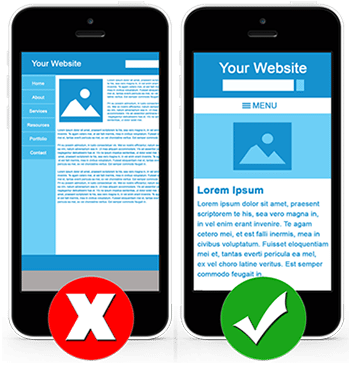
Google also uses mobile first indexing which means it primarily checks mobile version of your website. If your site is not fully optimized for different screen sizes, it can negatively affect both user experience and search performance.
Outdated Website Design Compared to Competitors
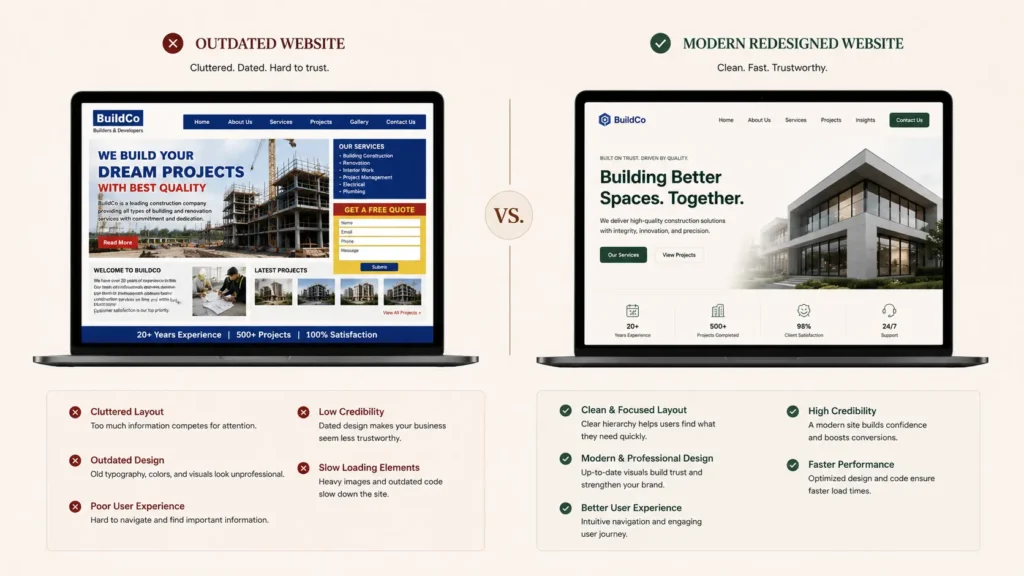
If your competitors have modern layout of website, fast loading pages, and strong calls to action but your website still looks older, users question your credibility and do not even look at your web content.
Redesigning website does not mean following all latest website design trends. You just need to focus on improving readability, accessibility, trust signals, and overall usability while keeping your brand identity consistent.
Low Conversion Rates Instead of Good Traffic
Only getting traffic on your website does not grow your business. If your website gets visitors but does not take any action from your call to action buttons that means your website is not fully conversion optimised.
For many service businesses, good conversion rate is between 2% and 5%. If your conversion rate has dropped without decline in traffic then you need to review your user journey, call-to-action placement, your page layout, and trust elements before assuming problem is marketing.
Site Takes More Than 3 Seconds to Load
If your website loading time exceeds 3 seconds, that affects your user satisfaction and conversions also. You can use tools such as Google Search Console and Google PageSpeed Insights to monitor Core Web Vitals. It includes:
- Largest Contentful Paint (LCP)
- Interaction to Next Paint (INP)
- Cumulative Layout Shift (CLS)
If these metrics are consistently declining, redesigning website is perfect opportunity for you to improve SEO performance.
How to Start Website Redesign (Step by Step Process)
Redesigning website does not mean you need to design website with fancy fonts, colors and layouts. To redesign website you need proper planning, it helps you preserve the SEO performance of website. If you want to know how to start website redesign, follow this website redesign checklist.
Step 1: Set Clear and Measurable Goals
To start every website redesign process, you need to set your clear goals. Without measurable goals, you can not identify what you would achieve after redesign.
| Business Goals |
| Increase website leads by specific percentage |
| Improve conversions on important landing pages. |
| Increase brand credibility and perception. |
| Also improve customer support and reduce service inquiries. |
| Website page load time should be under 2.5 seconds. |
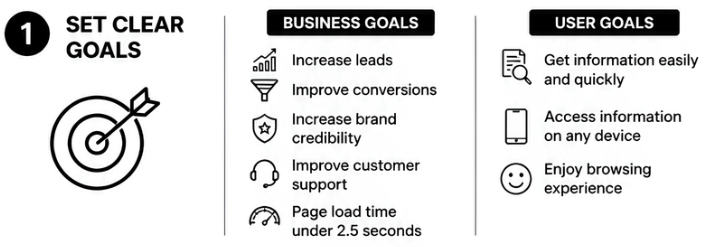
| User Goals |
| 1. Get information easily and quickly. |
| 2. Access information on any device. |
| 3. Users will enjoy browsing experience. |
These goals help you throughout the redesign process so you can maintain your SEO performance.
Step 2: Audit SEO of Your Current Website
If you start redesigning without checking what’s already working on your website, you will lose your website SEO performance. If you start with detailed SEO audit, it will help you maintain valuable SEO assets while identifying areas that need improvement.
- Check which pages generated highest organic traffic.
- Identify top ranking keywords of your website.
- Which pages have the strongest backlink profiles?
- Pages that have high conversion rates.
- Evaluate thin and outdated content.
- Check crawl errors, indexing issues and Core Web Vitals performance.
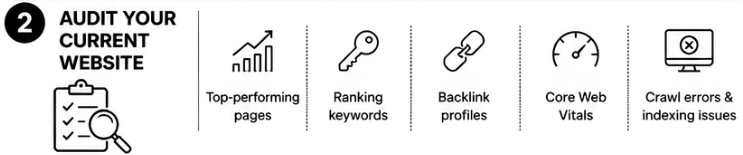
You can use tools such as Google Search Console and Google PageSpeed Insights to check website SEO performance. This audit helps you compare performance after redesign goes live.
Step 3: Map Every URL Before You Touch Design
Poor URL mapping can lose website rankings after redesign. Before you change page structure, create one spreadsheet that maps every existing URL to its new destination.
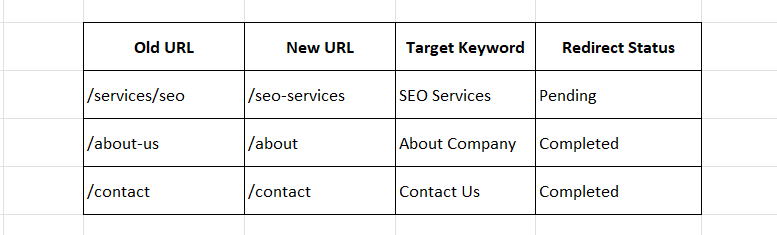
This format becomes your roadmap for implementing 301 redirects, ensuring both users and search engines reach correct pages after launch.
Never rely on memory when handling redirects. Even small websites can contain lots of URLs and larger websites may have more than hundreds.
Step 4: Build Content and Design in Staging Environment
Develop your new website in new secure staging environment. This allows your team to test layouts, functionality, and content without affecting live site.
Staging websites should not be indexed by search engines. If Google crawls both staging version and live website, duplicate content issues can arise, which can affect rankings.
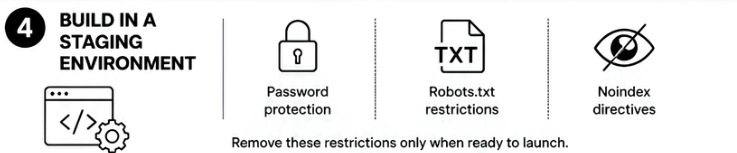
Before development begins, ensure staging environment is protected using methods such as
- Password protection
- Robots.txt restrictions
- Noindex directives
Only remove these restrictions once redesigned website is ready to launch.
Step 5: Test Before You Launch
Launching without testing sometimes leads to broken pages, missing content, and poor user experience. So before going live, complete comprehensive quality assurance checklist covering:
- Mobile responsiveness across different devices
- Contact forms and enquiry submissions
- Navigation menus
- Internal links
- Broken links (404 errors)
- Page speed performance
- Image optimization
- SSL certificate
- Schema markup
- XML sitemap generation
- Cross browser compatibility

It is also worth asking team members who were not involved in redesign to navigate website. Fresh eyes sometimes spot usability issues that developers and designers may have ignored. Few extra hours of testing can prevent weeks of troubleshooting after launch.
Step 6: Launch and Monitor Your Design
Publishing redesigned website is not end of project. Now your monitoring period starts.
During the First Week
Immediately after launch, you need to check:
- Website indexing status
- Crawl errors in Google Search Console
- Redirect functionality
- Broken links
- Contact form submissions
- Analytics tracking
- Page speed
- XML sitemap submission
Resolve issues quickly to minimise any impact on search visibility.
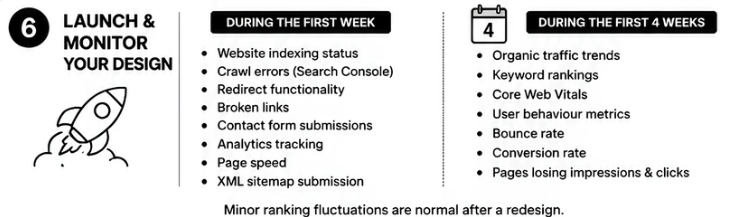
During First Four Weeks
In this period, continue monitoring:
- Organic traffic trends
- Keyword rankings
- Core Web Vitals
- User behaviour metrics
- Bounce rate
- Conversion rate
- Pages losing impressions and clicks
It is normal to see minor ranking fluctuations after redesign.
Also Read: Local SEO Checklist: 10 Easy Steps to Get Found Online
Website Redesign Cost in 2026
Every business ask same question before planning redesign is ‘What is the website redesign cost?’ The answer depends on your project, website size, content and what technical requirements you want. Every project is different so costs also vary according to your work requirements. Here is general pricing breakdown of website redesign costs in 2026:
| Website type | Cost (approx) |
| Small business website (5 to 10 pages) | ₹30,000 to ₹80,000 |
| Mid size business website (10 to 30 pages with custom features) | ₹80,000 to ₹250,000 |
| Enterprise | ₹250,000 to ₹1,000,000+ |
These figures are approximate costs of website redesign because actual costs depend on project scope, design complexity, and developer expertise.
What Factors Affect Website Redesign Cost?
Here are many factors that affect website redesign cost:
- Number of pages: More website pages mean more time is needed to plan, design, and test as compared to simple 7 to 8 pages of website. That affects cost of website redesign.
- Custom design vs. templates: Template based designs are faster and more affordable to build. But custom UI/UX design requires additional design and development time which is quite costly.
- eCommerce features: Online stores require inventory management, payment gateway integration, product migration and many more setups. These features increase project cost and complexity.
- Content Migration: Moving hundreds of blogs, landing pages, images, downloads, and case studies takes careful planning. Each page should keep its SEO value and deliver smooth, consistent user experience.
- SEO and redirect work: Technical SEO is very important part of website redesigning. But sometimes designers overlook it. For example, if mapping URLs, updating XML sitemaps, implementing 301 redirects and monitor rankings after launch require additional expertise.
If you are comparing website redesign services, choose team that includes design, development, technical SEO, and post launch monitoring in project scope. At EdibleWebTech, every redesign follows structured migration process designed to protect existing rankings while improving user experience and conversions. You can also explore our website development and SEO services pages to understand what’s included before requesting consultation.
What Are the Common Website Redesign Mistakes to Avoid
isually impressive design of website does not mean you get more traffic and conversions. If you ignore technical details during website redesign checklist, it will lose organic traffic and conversions. Here are most common website redesign mistakes to avoid with simple fixes.
- Ignoring SEO Audits Before Redesigning Website
Sometimes businesses start website redesign process without checking their high performing pages that bring traffic to their site. They remove valuable content unnecessarily which is performing well.
| Fix: Complete full SEO audit and check your high performing keywords, content and backlinks |
- Redirecting Everything to the Homepage
When you redirect every old page to homepage, it loses SEO value and frustrates your visitors. Search engines want old URLs to redirect to every relevant page.
| Fix: Use 301 redirect on old URLs to redirect to relevant page. |
- Missing SEO Metadata and Header Tags
When we start the website redesign process, we sometimes forget title tags, meta descriptions, H1 headings, and structured page hierarchy. This can reduce click through rates and search engines can’t understand your content.
| Fix: Export and preserve all important SEO metadata information before launching redesigned website. |
- Removing Content That Performs Well
Businesses sometimes remove old content without checking that those pages may already rank well and attract organic traffic.
| Fix: Always review your content performance without making any changes. Best option is to update and improve old content instead of removing it. |
- Direct Launching Without Testing on Mobile
If your website performs well on desktop but you did not test it on mobile, it hurts the performance of your website.
| Fix: Test every important page on different screen sizes before launch. |
- Forget to Block Staging Site on Search Engine
If you forget to block your staging site on search engines and Google indexes it, it may be considered duplicate content.
| Fix: Protect your staging environment with password protection and apply noindex directives until live website replaces it. |
- Ignoring Interaction to Next Paint Scores
Google uses INP as part of Core Web Vitals to measure website responsiveness. If you use heavy JavaScript and too many animations, it can increase your website load time when users interact with it.
| Fix: Reduce JavaScript execution, remove unnecessary animations, and regularly test performance using Google PageSpeed Insights. |

Conclusion
Website redesign is not about designing fancy websites. It requires careful planning, SEO preservation, performance testing, and continuous monitoring after launch. If you followed structured website redesign checklist, it will improve user experience, search visibility, and conversions.
If you are searching for website redesign services, schedule redesign consultation with EdibleWebTech. Our team will review your website, identify technical and SEO opportunities, and provide practical roadmap according to your business goals.
