
I noticed many beginners getting confused between Google Analytics vs Google Tag Manager. These two are powerful digital marketing analytics tools that provide accurate data. Many marketers still think that Google Analytics and Google Tag Manager are same thing. This confusion leads to poor tracking and incorrect decision making.
But in actuality, Google Analytics shows data to us and Google Tag Manager send data. If you try to use one without understanding the other then your tracking will always remain incomplete.
So to clear this confusion once and for all, this blog will explain:
- What is Google Analytics?
- What is Google Tag Manager?
- What is difference between Google Analytics and Google Tag Manager?
- How do GA4 and GTM work together to give accurate tracking results in 2025?
What is Google Analytics (GA4)?
Google Analytics is digital marketing analytic tool that is used to measure and reporting data that tells you what users are doing on your website or app. It tracks user activity, sessions, page views, conversions and traffic sources. GA4 is latest Google web analytic platform. Google Analytics helps businesses to understand the entire customer journey across devices and platforms.
Key Features of Google Analytics (GA4)
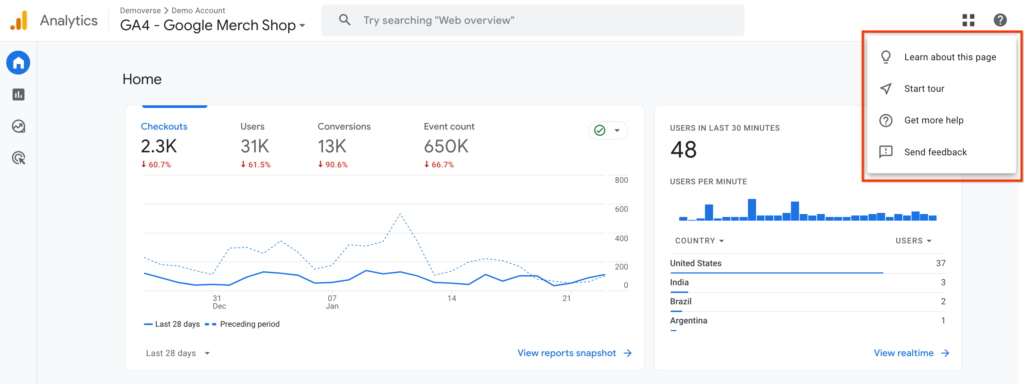
GA4 comes packed with features that make it one of the most powerful digital marketing analytics tools available today. Here are the features of GA4
- Real Time Data: GA4 provides you real time data which means you can track users activity on your website. This is really helpful at the time of product launching and marketing campaigns.
- Conversion Reporting: Google Analytics helps you decide which users are likely to convert or which ones might stop visiting your site. This helps you make smarter marketing decisions before problems arise.
- Cross Platform Tracking: It shows how people use your website and app together in one place. Since users often switch between devices and this cross platform tracking feature helps you see their full journey and understand their user behavior better.
- Customized Reports: You can get customized reports according to your business needs. GA4’s exploration tools help you study how users move through your site, where they drop off and how groups of users behave without needing advanced technical skills.
How Google Analytics Works?
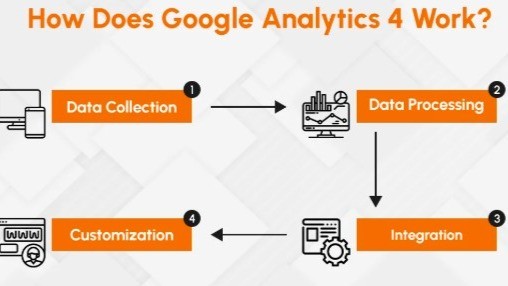
When someone visits your website there is small tracking code that collects details like which pages user looks at, how long they stay, and what device they use. This data is sent to Google Analytics which organizes it into easy to read reports. These reports help you see how your site is performing, understand what users do, and make smarter marketing choices.
For example:
A marketer can check which ads bring visitors who spend more time on the site or make purchases and then invest more in those successful campaigns.
What is Google Tag Manager (GTM)?
Google Tag Manager is free tool from Google that manages and controls website tracking codes without manually editing your website code. Their tags let you control and deploy tracking codes. Without any coding expertise, you can manage everything by yourself with user friendly dashboard. This makes GTM powerful tag management system for marketers who want control without coding.
Google Tag Manager is like universal remote control for all your tracking codes. When you add GTM code to your website, you can add and remove any tracking code through Google Tag Manager dashboard without changing your website code.
Key Features of Google Tag Manager (GTM)
Google Tag Manager features make tag management simpler and more efficient. Here are the features of GTM
- User Friendly Interface: GTM has user friendly interface where you can create–
- Tags (tracking codes)
- Triggers (rules for when tags should run)
- Values (extra details, tags and triggers used)
It also has preview mode so you can test everything first and make sure nothing breaks before changes go live.
- Data Layer in GTM: The data layer in Google Tag Manager is like shared box where your website stores important details. GTM then uses this box to give the same reliable data to all your tracking tags so everything stays consistent and accurate.
- Version control: Version control in GTM means every change you make is saved as version. If something goes wrong, you can easily go back to previous setup. This makes it safe for marketers to test and improve without worrying about breaking their tracking forever.
Also Read: How To Set Up a Google Ads Campaign: A 2025 Beginner’s Guide
How Does Google Tag Manager Work?
GTM works like control center. They work with three main blocks, i.e. tags, triggers, and values.
- Tags are small pieces of code that send data to tools like Google Analytics or Facebook Pixel.
- Triggers are rules that decide when those tags should run.
- Variables are extra details like page address that help the tags and triggers work properly.
GTM manages multiple tracking tags for different platforms in one place. Without needing coding expertise marketers can implement this very simpler way.
Google Analytics vs Google Tag Manager: What’s the Difference?
Now lets talk about the main question that Google Analytics vs Google Tag Manager. To make effective website tracking strategy its important to understand difference between Google Analytics and Google Tag Manager.
| Aspect | Google Analytics | Google Tag Manager |
| 1. Purpose | The main purpose of Google Analytics is to collect, process and report website or app data. | GTM controls and deploys tracking codes properly. |
| 2. Events Tracking | GA4 tracks detailed user activity | GTM helps send data to GA4 by managing and firing GA4 tags on your website. |
| 3. Conversions | GA4 shows activity of users from the moment they arrive until they make purchase. | You can set up tags to record conversion actions that show when users complete important goals. |
| 4. Reporting | GA4 provides detailed reports on user behavior, traffic sources, and conversion performance. | It gathers accurate information from your website and sends to your analytics tools so reporting becomes smooth and reliable. |
| 5. User Interface | GA4 interface deeply shows user behaviour and website performance. | GTM interface is designed to make it easy for marketers to edit, add, and manage tags. |
| 6. Integration | GA4 connects smoothly with other Google tools, like Google Ads to make it easier to analyze and use your data. | Google Tag Manager supports both Google and third party tags which makes it useful for all kinds of marketing needs. |
| 7. Data Privacy | It includes features like hiding personal details and consent mode which help websites follow data protection rules. | It focuses only on tag management. It does not store data. |
| 8. Ease of Use | Google Analytics is easier to use. It guides you through setup and gives automatic insights to help you start quickly. | GTM is easy to use but you still need some basic knowledge of how tags and triggers work to set it up. |
How Google Analytics and Google Tag Manager Work Together?
Google Analytics and Google Tag Manager work together for efficient tracking setup. GTM focuses on managing and deploying tracking tags and GA4 receives data to turn it into actionable insights. This partnership gives you both easy setup with GTM and strong analytics with GA4.
How to Set Up GA Tag Inside GTM?
1. Add GA4 Tag
- Go to GTM → create new tag → choose GA4 Configuration.
- Enter your GA4 Measurement ID like (G-XXXXXXXXXX).
- Set the trigger to All Pages so it runs on every page.
2. Track Events (like clicks/form submissions)
- Create trigger for the action you want such as button click.
- Make GA4 Event Tag and link it to that trigger.
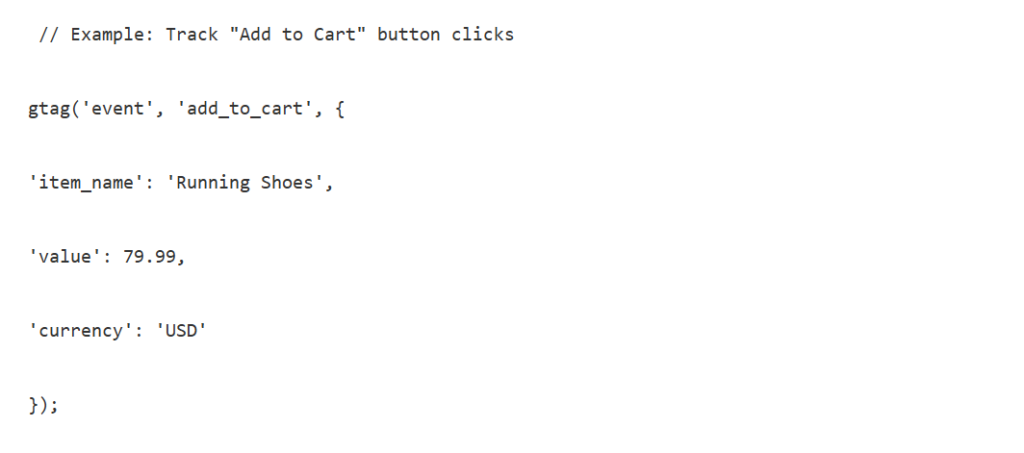
Example: Track ‘add to cart’ clicks → GA4 records the event when someone presses the button.
3. Preview and Test
- Use GTM’s Preview Mode to check if tags fire correctly.
- Make sure no duplicate events are sent.
4. Publish
- Once everything works then publish your container.
- GTM will handle all tracking without needing to edit your website code.
Conclusions
To get accurate tracking results, understanding the difference between Google Analytics and Google Tag Manager is essential. GA4 helps you measure and analyze user behavior and GTM helps you send detailed tracking data without coding. If you want best results. Used GTM and GA4 together. When combined, they help you understand your customers, improve user experience, and increase conversions. If you want reliable marketing decisions, both digital marketing analytics tools are must haves in your digital strategy.
FAQ’s for Google Analytics vs Google Tag Manager
Q1. Can I use Google Tag Manager without Google Analytics?
Ans. Yes. You can use Google Tag Manager without Google Analytics because GTM deploys tags for many other platforms also.
Q2. What are the benefits of Google Tag Manager?
Ans. Google Tag Manager saves time, makes tracking easier, and lets you manage all tags in one place.
Q3. What is Google Analytics?
Ans. Google Analytics (GA4) is digital marketing analytics tool that shows how people use your website or app like visits and conversions.
Q4. How does Google Tag Manager improve website performance?
Ans. GTM keeps your site code cleaner which helps pages load faster and run smoothly.
